
How to Bulk Withdraw Old LinkedIn Connection Requests
LinkedIn doesn’t give you a way to bulk-withdraw sent connection requests. You can withdraw them one at a time, buried three clicks deep per person, which is tedious enough that most people just leave a graveyard of unanswered requests sitting there indefinitely.
Here’s a console script that handles it in bulk. You set an age threshold – I use 14 days – and it withdraws everything older than that.
Why Delete Old Connection Requests on LinkedIn
One of the most overlooked LinkedIn habits is cleaning up old, unanswered connection requests. Pending requests that have been sitting for months are unlikely to ever be accepted, and they count toward LinkedIn’s limit on outstanding invitations.
Regularly deleting stale requests frees up room to connect with new prospects who are more likely to engage, keeps your networking efforts focused on active users, and can improve the overall effectiveness of your outreach strategy.
As a general rule, if a connection request has gone unanswered for 30-60 days, it’s usually worth removing and moving on.
How to run it
- Go to linkedin.com/mynetwork/invitation-manager/sent/ and scroll all the way to the bottom. LinkedIn lazy-loads the list, and this script only sees what is showing in your browser.
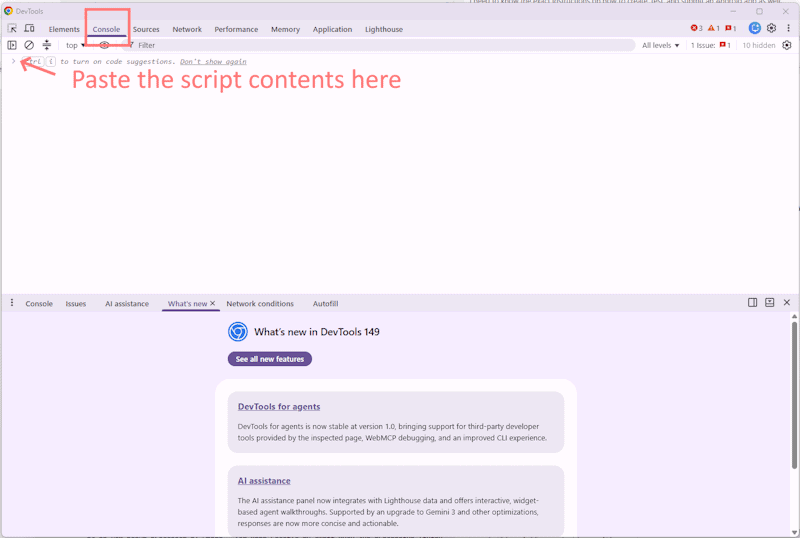
- Open DevTools (Cmd+Option+J on Mac, Ctrl+Shift+J on Windows).
- Go to the “Console Tab”.
- Paste the script with DRY_RUN = true (line 3) first. It’ll log every request it would withdraw without touching anything.
- Once you’re satisfied with the preview, set DRY_RUN = false and run again.
- When running, the script should do everything for you. There will be a popup notification to confirm you want to delete the connection request. Don’t touch this. The script should click on this automatically.
- Be sure to keep the LinkedIn browser window open. There will be notes in the console as the script works its magic. It will tell you when it’s complete.
The 1.2-second delay between withdrawals is intentional – it keeps LinkedIn from rate-limiting you and gives all confirmation dialogs time to appear and get clicked.
The script
(async () => {
  const MAX_AGE_DAYS = 14;
  const DRY_RUN = true;
  const delay = ms => new Promise(r => setTimeout(r, ms));

  function parseSentText(text) {
    const m = text.match(/Sent\s+(\d+)\s+(minute|hour|day|week|month|year)/i);
    if (!m) return null;
    const n = +m[1], unit = m[2].toLowerCase();
    const ms = {
      minute: 6e4, hour: 36e5, day: 864e5,
      week: 6048e5, month: 2592e6, year: 31536e6
    }[unit] ?? 0;
    const fudge = (unit === 'month') ? 2592e6 : (unit === 'year') ? 31536e6 : 0;
    return Date.now() - (n * ms + fudge);
  }

  const cutoff = Date.now() - MAX_AGE_DAYS * 864e5;
  const rows = document.querySelectorAll('[role="listitem"]');
  console.log(`Found ${rows.length} row(s) on page.`);

  let matched = 0, withdrawn = 0;

  for (const row of rows) {
    let sentTime = null, sentLabel = '';
    for (const el of row.querySelectorAll('*')) {
      if (el.children.length === 0) {
        const t = el.textContent.trim();
        if (/^Sent\s+\d+/i.test(t)) {
          sentTime = parseSentText(t);
          sentLabel = t;
          break;
        }
      }
    }

    if (!sentTime || sentTime > cutoff) continue;

    let name = '(unknown)';
    for (const el of row.querySelectorAll('*')) {
      if (el.children.length === 0) {
        const t = el.textContent.trim();
        if (t && !/^Sent/i.test(t) && !/withdraw/i.test(t) && t.length > 1 && t.length < 60) {
          name = t;
          break;
        }
      }
    }

    matched++;

    if (DRY_RUN) {
      console.log(`[dry run] Would withdraw: ${name} (${sentLabel})`);
      continue;
    }

    let withdrawEl = null;
    for (const el of row.querySelectorAll('*')) {
      if (el.children.length === 0 && /^withdraw$/i.test(el.textContent.trim())) {
        withdrawEl = el;
        break;
      }
    }

    if (!withdrawEl) { console.warn(`No withdraw element for ${name}`); continue; }

    withdrawEl.click();
    await delay(800);

    const confirm = [...document.querySelectorAll('button, [role="button"]')]
      .find(b => /^withdraw$/i.test(b.textContent.trim()) || /confirm/i.test(b.textContent.trim()));
    if (confirm) { confirm.click(); await delay(400); }

    console.log(`Withdrawn: ${name} (${sentLabel})`);
    withdrawn++;
    await delay(1200);
  }

  // Dismiss any lingering confirmation dialog after the final withdrawal
  const finalConfirm = [...document.querySelectorAll('button, [role="button"]')]
    .find(b => /^withdraw$/i.test(b.textContent.trim()) || /confirm/i.test(b.textContent.trim()));
  if (finalConfirm) { finalConfirm.click(); await delay(400); }

  const action = DRY_RUN ? `Would withdraw ${matched}` : `Withdrew ${withdrawn}`;
  console.log(`\n✓ Done. ${action} request(s) older than ${MAX_AGE_DAYS} days.`);
})();
A note on fragility
This script works as of mid-2026. LinkedIn’s DOM structure changes periodically. If it stops working, the first thing to check is whether the “Sent X ago” text format has changed – that’s the load-bearing assumption. You can verify with:
document.querySelectorAll('[role="listitem"]').forEach(row => {
  [...row.querySelectorAll('*')]
    .filter(el => el.children.length === 0 && el.textContent.trim())
    .forEach(el => console.log(JSON.stringify(el.textContent.trim())));
  console.log('---');
});
That dumps the text content of every leaf node in every row, which tells you exactly what you’re working with.
Good luck!


